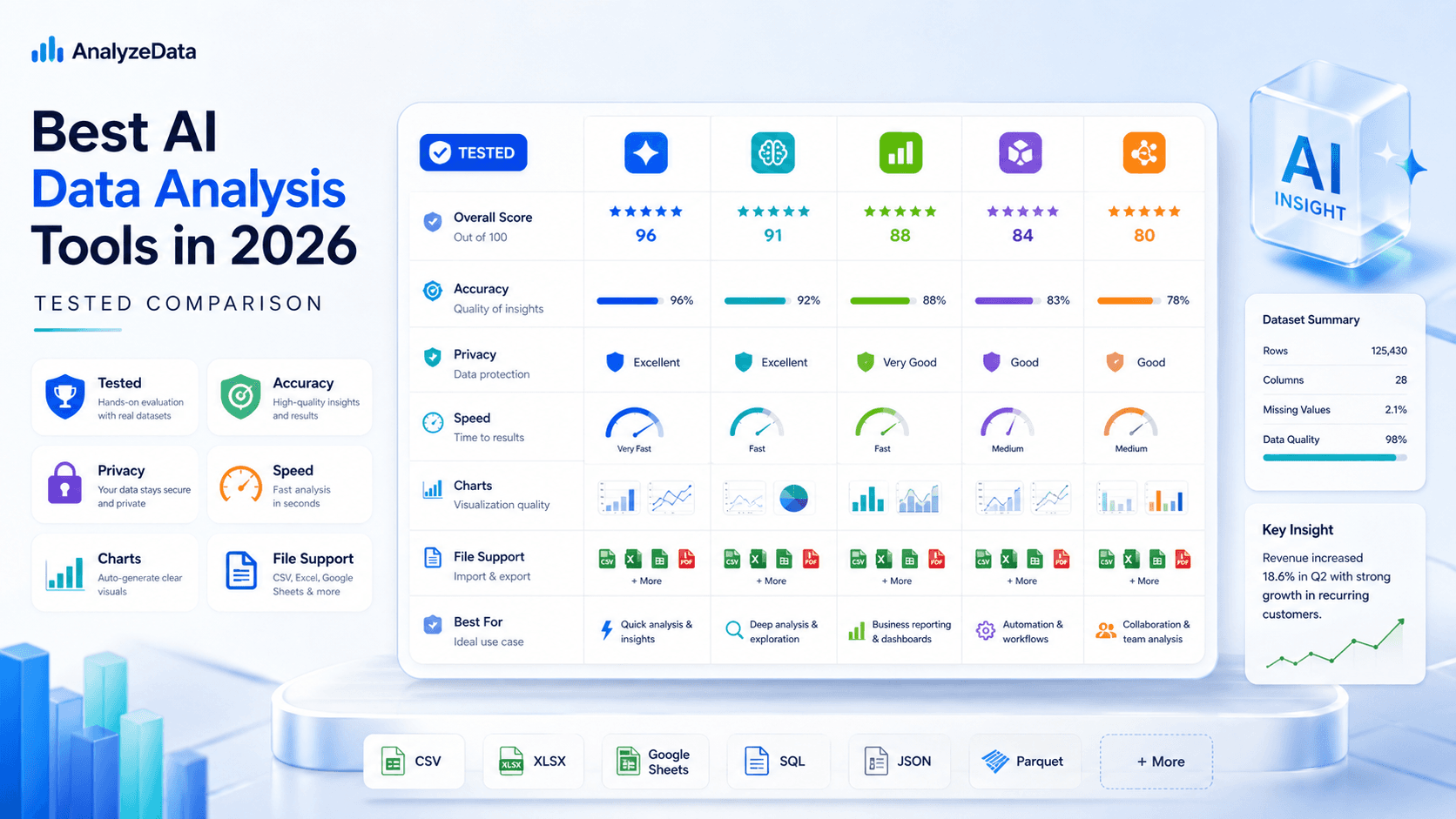
Best AI for Data Analysis (2026): Free Tools Compared
Which AI is best for data analysis? Compare 6 AI data analysis tools on accuracy, privacy, and price — including a free, no-signup analyzer for CSV and Excel.
Ashesh Dhakal
Published February 20, 2026 · Updated August 10, 2026
Which AI Is Best for Data Analysis? Quick Answers
If you are comparing AI tools for data analysis, start by matching the tool to the job:
| Question | Short answer |
|---|---|
| What is the best AI for data analysis? | AnalyzeData for free file analysis, Julius AI for deeper multi-step work, Tableau AI for enterprise BI, ChatGPT for conversational exploration, and Copilot for Excel teams. |
| Which AI is best for data analysis without signup? | AnalyzeData — it analyzes CSV, Excel, JSON, and TSV files without requiring an account. |
| What is the best free AI for data analysis? | AnalyzeData. It is free in open beta, needs no account or credit card, and runs real statistical analysis with charts. |
| What is the fastest AI for data analysis? | For small and mid-size structured files, AnalyzeData is fastest because the workflow starts at upload — no notebook, BI, or prompt setup. |
| Which AI data analyst is most accurate for large datasets? | For very large datasets, enterprise systems connected to governed warehouses usually win. For uploaded files up to 50,000 rows, AnalyzeData is built for quick, explainable analysis. |
| What AI tools can analyze data and create charts? | AnalyzeData, Julius AI, ChatGPT Advanced Data Analysis, Microsoft Copilot, Gemini, Tableau AI, and Power BI Copilot can all support analysis and visualization in different ways. |
This comparison focuses on practical AI data analysis: whether the tool can read real files, produce correct statistics, explain the analyzed data, generate charts, make privacy review possible, and return answers quickly enough for everyday work.
How We Compare AI Data Analysis Tools
"What is the best AI for analyzing data?" has several answers depending on who is asking. A small business owner reading monthly sales trends has different requirements than a data scientist building predictive models — and a privacy-conscious analyst handling customer records has different constraints than a researcher with anonymized survey data. So instead of declaring one winner for everyone, this guide applies one consistent framework and matches each tool to the use case it actually wins.
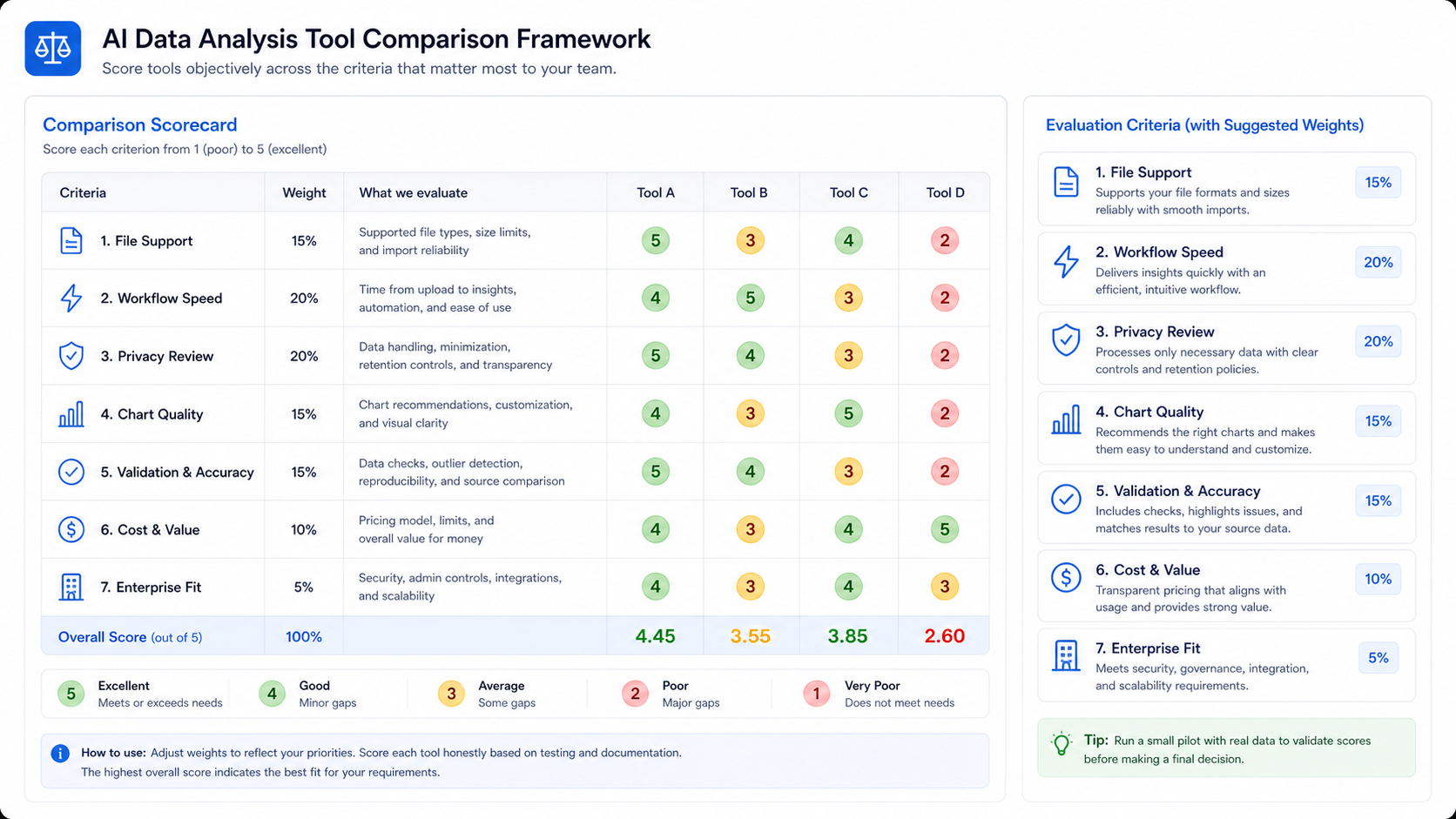
This is a workflow comparison, not a laboratory benchmark, scored on six practical criteria:
| Criterion | What it measures |
|---|---|
| Ease of use | Can a non-technical user get meaningful results without a tutorial — and without expert-level prompting? |
| Accuracy | Does the tool produce correct statistical results and identify genuine patterns rather than spurious correlations? |
| File format support | Real business data lives in CSV, Excel (XLSX), JSON, and TSV. Tools that only read CSV exclude a large share of real files. |
| Privacy and data handling | Is it clear where your file goes, how long it is stored, and who can access it? For customer or financial data, this is a primary criterion, not a footnote. |
| Speed to answer | How long from file upload to a usable first result — seconds, minutes, or hours? |
| Cost | What does the free tier actually provide, and what does useful output really cost? |
For accuracy specifically: whichever tool you choose, validate important outputs against a dataset where you already know the expected answer. And because vendor features, plans, and data controls change over time, verify current product documentation before uploading sensitive files or buying a team plan — for example, OpenAI documents ChatGPT file uploads, and Microsoft documents Copilot for Excel separately from general Microsoft 365 plans.
The Best AI Tools for Analyzing Data in 2026
1. AnalyzeData — Best Free AI Data Analyzer
Analyze Data AI is the strongest choice for anyone who wants a genuinely free, privacy-respecting AI data analysis tool with no strings attached.
The value proposition is unusually clean: upload your file, ask questions in plain English, get analysis and visualizations computed by real Python code — not model guesses. No account required. No credit card. Files up to 10MB and 50,000 rows. Supports CSV, Excel (XLSX), JSON, and TSV — the formats that cover the overwhelming majority of business data.
What distinguishes AnalyzeData from other free AI data analysis tools is its architecture. Your file is parsed client-side in your browser before the analysis request is prepared. The request can use the schema and a bounded set of rows needed to answer the question, while the application avoids storing uploaded files on a server. For analysts working with customer data, employee data, financial records, or any other sensitive information, that browser-first workflow is a practical advantage.
The analytical capability is genuine, not superficial. AnalyzeData identifies trends, calculates statistics, detects correlations, flags anomalies, and generates professional-quality charts. The AI data visualization tool produces bar charts, line graphs, scatter plots, pie charts, and other visualization types you can use directly in reports. Analysis completes in seconds for most datasets.
The limitations are real: the 50,000-row cap excludes very large datasets, there is no multi-table analysis, and you cannot schedule automated reports. For the target audience — anyone who needs quick, private, free analysis of a structured file — these limitations rarely matter.
File-first fit score: 9.2/10
- Ease of use: 10/10
- Accuracy: 9/10 (answers computed by executed code)
- File format support: 9/10
- Privacy: 9/10 (client-side parsing plus bounded AI request)
- Speed: 10/10
- Cost: 10/10 (free in open beta)
2. Julius AI — Best for Power Users
Julius AI has established itself as the go-to tool for analysts who need more analytical depth than free tools provide but are not operating at enterprise scale. The platform supports multi-step analytical workflows, larger file sizes, and a richer set of statistical methods than most accessible tools.
The interface is conversational but more structured than a general-purpose chatbot. Julius AI understands that data analysis is iterative — it maintains context across a session, allowing you to build on previous analyses rather than starting fresh with each question. The visualization output is high quality, and the platform supports exporting results in multiple formats.
Where Julius AI earns its "power user" label is in its handling of complex analytical requests: multi-variable regression, time-series decomposition, cohort analysis. The tradeoff is cost and complexity — paid plans may be more than a casual spreadsheet user needs, and the interface can be overkill for straightforward analysis tasks.
Comparison score: 8.4/10
- Ease of use: 7/10 (better for technical users)
- Accuracy: 9/10
- File format support: 8/10
- Privacy: 7/10 (files uploaded to servers)
- Speed: 8/10
- Cost: 6/10 (paid plans required for full access)
3. ChatGPT Data Analysis — Best for Conversational Analysis
ChatGPT's Advanced Data Analysis feature (available to Plus subscribers) is the best option for analysts who think in conversation and value the ability to iterate, redirect, and explore tangents through natural dialogue.
The underlying capability — Code Interpreter writing and executing Python in a sandboxed environment — is genuinely powerful. You can attach CSV files (and other formats with some limitations), and ChatGPT will write pandas code, run it, show you the output, and explain what it found. The conversational nature means you can redirect mid-analysis: "Actually, ignore the outliers and redo that calculation" — and ChatGPT adapts immediately.
The limitations matter for serious analytical use. Free-tier users may face limits that make sustained analysis impractical. Files are handled inside ChatGPT's upload workflow, so privacy and retention depend on your current plan and settings. There is no data profile, no automatic chart recommendation, no analysis history. And for tasks requiring statistical rigor, the conversational format can produce analyses that sound thorough but miss methodological nuance.
For analysts who already pay for ChatGPT Plus, this is the path of least resistance. For users evaluating tools specifically for data analysis, AnalyzeData delivers better purpose-built results at no cost.
Comparison score: 7.8/10
- Ease of use: 8/10
- Accuracy: 8/10
- File format support: 7/10
- Privacy: 6/10 (files uploaded to OpenAI)
- Speed: 7/10
- Cost: 6/10 (paid plan may be needed for sustained use)
4. Microsoft Copilot for Excel — Best for Excel Users
Microsoft Copilot for Excel is the most seamless AI data analysis experience for the massive population of analysts whose workflow centers on Excel. The integration is native — Copilot lives in the Excel interface, can reference any open workbook directly, and can read from or write to cells as part of its analytical actions.
Practical capabilities include writing complex formulas, creating pivot tables, building charts, answering questions about your data, and generating summaries. For teams that do not want to change their tooling, Copilot adds AI capabilities to a familiar environment without requiring data export or platform switching.
The honest limitations: full Copilot capability requires a Microsoft 365 Copilot add-on subscription on top of the base Microsoft 365 cost — not trivial for small organizations. The web version of Excel offers limited Copilot features in its free tier. And Copilot in Excel is strong at Excel-style tasks (formulas, pivot tables) but weaker at the kind of exploratory AI analysis that purpose-built tools provide.
Comparison score: 7.5/10
- Ease of use: 9/10 (for Excel users specifically)
- Accuracy: 8/10
- File format support: 9/10 (native Excel; CSV import works well)
- Privacy: 7/10 (processed through Microsoft cloud)
- Speed: 8/10
- Cost: 5/10 (requires paid M365 Copilot subscription)
5. Google Gemini — Best Integrated AI
Google Gemini, accessible at gemini.google.com with a Google account, offers data analysis through file attachments and, crucially, direct integration with Google Sheets via Google Workspace. For organizations running on Google Workspace, Gemini's ability to connect to Sheets data without an export step is a meaningful convenience.
Gemini's analytical quality reflects its underlying model capability — responses are detailed, well-reasoned, and handle complex questions with sophistication. The free tier is genuinely functional, though capped in daily usage, and the model rarely fails to understand what you are asking for.
What prevents Gemini from ranking higher for pure data analysis is its general-purpose design (it is an AI assistant, not a data analysis tool) and the privacy implications of Google processing your uploaded data. For sensitive business data, uploading to Google's servers creates exposure that many organizations will not accept.
Comparison score: 7.2/10
- Ease of use: 8/10
- Accuracy: 8/10
- File format support: 7/10 (CSV; best via Google Sheets integration)
- Privacy: 6/10 (processed through Google cloud)
- Speed: 8/10
- Cost: 7/10 (genuinely free tier, though limited)
6. Tableau AI — Best for Enterprise BI
Tableau has integrated AI deeply into its platform, combining the established strengths of its visualization and BI infrastructure with AI-powered insight generation, natural language queries, and automated analysis. For enterprises with existing Tableau deployments, the AI features extend value from existing investments rather than requiring a separate tool adoption.
Tableau's AI features — including Tableau Pulse for automated metric monitoring and AI-generated narrative summaries — represent genuinely sophisticated capability at enterprise scale. The platform handles extremely large datasets, integrates with enterprise data infrastructure, and supports the governance, access control, and audit requirements large organizations need.
The elephant in the room is cost. Tableau is priced at enterprise scale, with per-seat licensing that makes it inaccessible for small teams or individual users. For users without existing Tableau infrastructure, the implementation and learning curve represent significant investments. Tableau AI is the best choice for enterprise BI teams — and the wrong choice for everyone else.
Comparison score: 8.0/10 (for enterprise use cases)
- Ease of use: 6/10 (requires Tableau expertise)
- Accuracy: 9/10
- File format support: 9/10 (connects to virtually any data source)
- Privacy: 8/10 (enterprise deployment options)
- Speed: 8/10
- Cost: 3/10 (enterprise pricing only)
AI Data Analysis Tools Compared
| Tool | Pricing | File Formats | Privacy | Ease of Use | Chart Generation | Free Tier |
|---|---|---|---|---|---|---|
| AnalyzeData | Free (open beta) | CSV, Excel, JSON, TSV | Client-side parsing, bounded AI request | Very easy | Yes (full) | Yes — free, no signup |
| Julius AI | Paid | CSV, Excel, more | Server upload | Moderate | Yes | Limited trial |
| ChatGPT Analysis | Free and paid plans vary | CSV, some others | ChatGPT upload workflow | Easy | Yes | Limited by plan |
| Microsoft Copilot | Microsoft 365 Copilot plans | Excel, CSV | Microsoft cloud | Easy (Excel users) | Yes | Depends on plan |
| Google Gemini | Free (Google account) | CSV, Google Sheets | Google cloud | Easy | Basic | Yes |
| Tableau AI | Enterprise pricing | All enterprise sources | Private deploy option | Complex | Yes (advanced) | No |
How to Choose the Best AI for Your Data
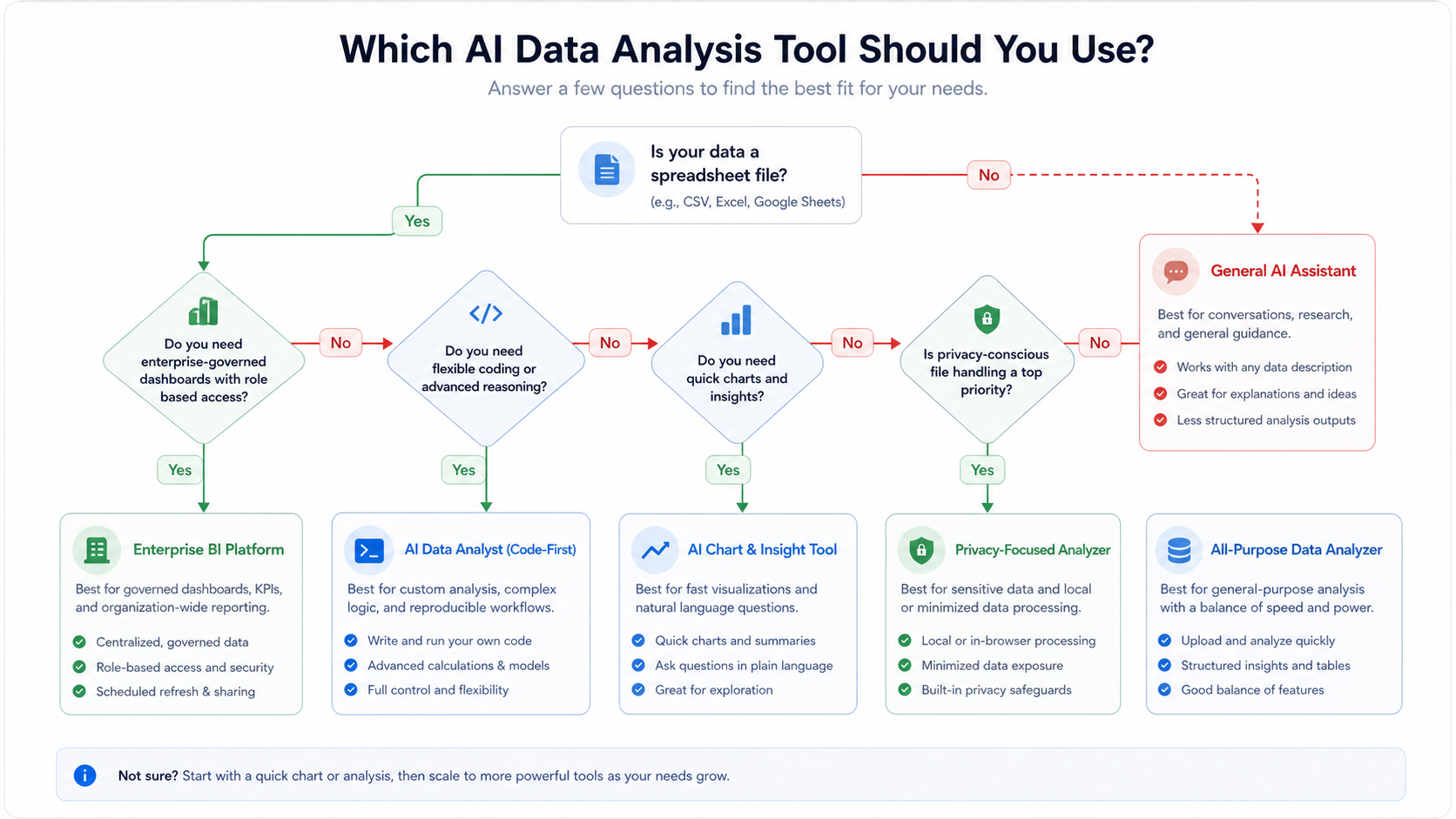
The right choice depends on your specific situation. Here is a direct guide:
For quick free analysis with no account → AnalyzeData
If you need to analyze a CSV, Excel, JSON, or TSV file right now, for free, without creating an account, with privacy-conscious file handling, Analyze Data AI is the answer. Upload your file, ask your question, get your answer. There is no better combination of capability, accessibility, and cost in this category.
For team collaboration and complex multi-step analysis → Julius AI
When your analysis requires multi-variable investigations, iterative refinement across a team, and more analytical depth than free tools provide, Julius AI is the best choice in the paid accessible tier. The cost is justified for teams running frequent, complex analyses.
For conversational exploration → ChatGPT Advanced Data Analysis
If you are already a ChatGPT Plus subscriber and want to explore data through natural conversation, the Advanced Data Analysis feature is a powerful addition to your existing toolkit. Not the right choice as a standalone data analysis investment.
For Excel power users → Microsoft Copilot
If your entire workflow lives in Excel and you want AI help without changing tools, Microsoft Copilot in Excel is the natural choice. Accept the cost of the M365 Copilot subscription as the price of seamless integration.
For enterprise BI → Tableau AI or Power BI Copilot
Enterprise organizations with existing Tableau or Power BI deployments should extend those investments with the AI capabilities already built in. The infrastructure, governance, and scale advantages of established enterprise BI platforms outweigh the newer AI-first tools at enterprise scale.
Accuracy, Speed, and Dataset Size
The most accurate AI analyst system for large datasets in 2026 is usually not a simple file-upload tool. If your data lives in millions of rows across a warehouse, BI platform, or governed enterprise database, tools like Tableau AI, Power BI Copilot, and Databricks-style analytics systems are better suited because they connect directly to large, controlled data sources.
For everyday CSV and Excel analysis, the decision is different. Most business users are not analyzing billions of rows; they are trying to understand a spreadsheet, a marketing export, a customer survey, or a sales report. In that workflow, the best AI tool is the one that can read the file, explain the analyzed data clearly, generate useful charts, and avoid unnecessary setup.
AnalyzeData is strongest in that file-first category. It is not positioned as the most accurate enterprise AI analyst system for massive databases. It is built to be fast, private, and clear for structured files up to 50,000 rows, which covers many real ad-hoc analysis tasks — and because its answers come from executed Python code rather than model guesses, results can be checked line by line.
Fastest AI for Data Analysis
The fastest AI for data analysis is the tool that removes setup from the workflow. For many users, the slow part is not the model response; it is cleaning the file, choosing a chart type, opening a BI tool, writing Python, or explaining the data structure to a general chatbot.
AnalyzeData is fast because the path is direct: upload the file, ask the question, and get a summary, statistics, trends, and charts. ChatGPT Advanced Data Analysis can be flexible, but it often requires more prompting. BI tools can be powerful, but they require more setup.
Which AI Is Best for Data Analysis?
Which AI is best for data analysis depends on the constraint:
- Choose AnalyzeData if you want free, private CSV or Excel analysis without signup.
- Choose Julius AI if you need deeper multi-step analytical workflows.
- Choose ChatGPT Advanced Data Analysis if you prefer conversational exploration and already pay for ChatGPT.
- Choose Microsoft Copilot if your workflow is entirely inside Excel.
- Choose Tableau AI or Power BI Copilot if your team already runs enterprise BI infrastructure.
AI Tools to Analyze Data
The strongest AI tools to analyze data all solve different parts of the workflow. AnalyzeData is best when the file is already in your hands and you want a fast answer. ChatGPT is useful when you want a flexible conversation. Julius AI is better for deeper multi-step analysis. Microsoft Copilot is convenient for Excel users. Tableau AI and Power BI Copilot are stronger when the data already lives in a BI stack.
If your question is simply "what AI can I use to analyze data from a spreadsheet?", start with the file format, privacy requirement, and dataset size. That narrows the choice faster than comparing model names alone.
FAQ
What is the best free AI tool for analyzing data without signing up?
Analyze Data AI is the best free AI data analysis tool that requires no account, no signup, and no payment (currently free in open beta). It supports CSV, Excel, JSON, and TSV files up to 10MB and 50,000 rows, generates charts, parses files client-side, and avoids storing uploaded files on an application server.
How do I choose between AI data analysis tools?
Start with these questions: Do you need free? (AnalyzeData.) Do you need to stay in Excel? (Copilot.) Do you need enterprise scale? (Tableau or Power BI.) Do you need conversational flexibility? (ChatGPT Plus.) Do you need deep multi-step analysis as a power user? (Julius AI.) Match the tool to your most critical requirement first.
Can AI analyze Excel files directly?
Yes. AnalyzeData, Julius AI, Microsoft Copilot, and most leading tools support Excel (XLSX) files directly, without requiring conversion to CSV. This is an important capability since most non-technical users store their data in Excel format.
Is AI data analysis accurate enough for business decisions?
For most business analysis tasks — trend identification, segmentation, correlation analysis, summary statistics — AI tools are highly accurate when given clean, well-structured data, and tools that compute answers with executed code (rather than model estimation) are easier to verify. For decisions with significant financial, legal, or operational consequences, always validate AI-generated insights against your source data and, where appropriate, against the judgment of a domain expert.
What AI is best for analyzing large datasets?
For very large datasets (millions of rows), enterprise platforms like Tableau AI, Power BI, and Databricks are the appropriate choice — they integrate with data warehouses and can handle scale that file-upload tools cannot. For datasets up to 50,000 rows (which covers most business analysis needs), AnalyzeData is the best free option.
Get Started
The fastest way to discover what AI data analysis can do is to try it on your own data. Analyze Data AI is free in open beta, requires no account, and lets you upload your dataset and start asking questions in seconds. Your file is parsed in your browser before analysis, with no uploaded-file database and zero cost.
For visualization-focused analysis, the AI data visualization tool creates professional charts from your data in plain English. No chart-building experience required.
Ashesh Dhakal
Founder & Data Scientist
Ashesh Dhakal is a Data Science student at the University of Manitoba and a full-stack developer specializing in AI-powered applications. He holds a Computer Programming Diploma with Honors. His expertise spans explainable AI, natural language processing, and building production AI platforms.
Related Articles

ChatGPT Data Analysis: When It Works & a Free Alternative
Can ChatGPT analyze data? Yes. See how it handles CSV and Excel files, where verified charts and reports differ, and a free no-signup alternative.

How to Analyze CSV Data with AI (Free CSV Analyzer)
Analyze CSV data with AI free online — upload a CSV, ask in plain English, and get charts and statistics computed by real Python. No signup in open beta.

How to Analyze Excel Data with AI (Free, No Formulas)
Analyze Excel data with AI free: upload your .xlsx, ask in plain English, and verify every calculation without writing formulas. Real Python, no signup.