
Is It Safe to Upload Your Data to an AI Analysis Tool?
What happens to your file when you upload it to an AI tool: in-browser parsing vs server uploads, what gets stored, and what to check before uploading.
Ashesh Dhakal
Published May 17, 2026 · Updated August 18, 2026
Yes, uploading a file to an AI analysis tool can be safe, but only if the tool can tell you exactly what happens to that file. In AnalyzeData, the answer is short: your file is parsed in your browser, the analysis processes your data transiently in an isolated sandbox, larger files travel as a temporary file that is deleted when the analysis finishes, and nothing is stored unless you choose to create a report. AI processing runs on the API tier, which is not used to train models on your data.
That is the standard any tool should meet. Before you upload a spreadsheet, a survey export, or a message log, check four things: where the file is read (in your browser or on a server), whether processing is transient or retained, whether your data trains the model, and what persists after the analysis ends. A tool that documents all four answers is usually fine for everyday business data. A tool that cannot answer them is not.
The caution is warranted. A sales spreadsheet can include customer emails. A survey export can include free-text responses. A finance file can include private costs, salaries, or transaction notes. This guide explains the privacy and security checks that matter and how to use AnalyzeData's private AI data analysis workflow more safely for everyday CSV and Excel analysis.
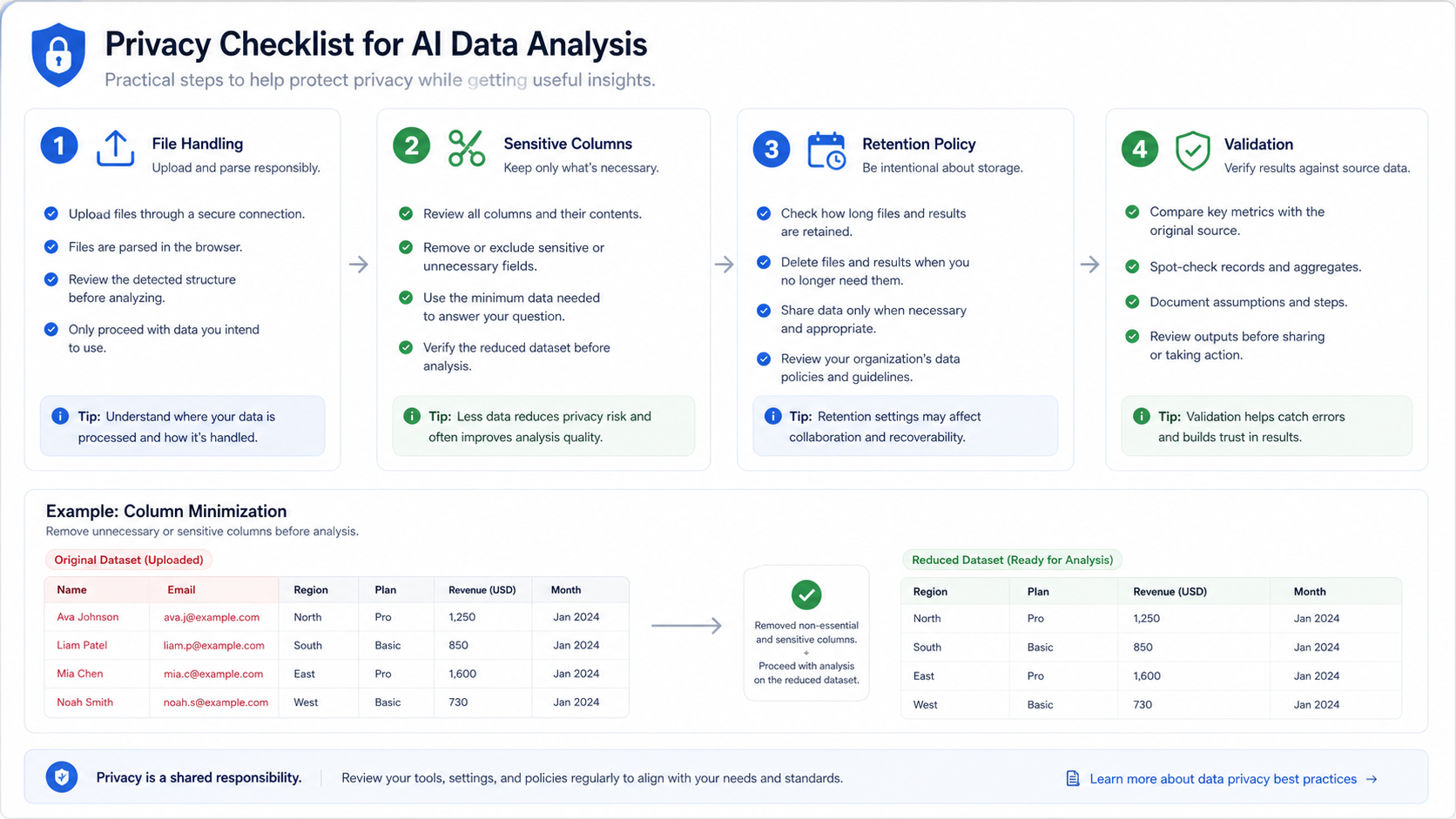
Is It Safe To Upload Data To AI?
Sometimes yes, sometimes no — and the honest answer is that "AI" is not one thing. Safety depends on three concrete facts about the specific tool:
- Where the file is read. Some tools upload the whole file to a server immediately. Others, like AnalyzeData, parse the file in your browser first, so the raw file never needs to be stored on an application server. When a larger file does have to travel, it moves as a temporary file that is deleted when the analysis finishes.
- What happens during analysis. Even a browser-first tool has to send some data to answer your question. What matters is whether that processing is transient (used for the answer, then gone) and whether the provider trains on it. AnalyzeData processes analysis data transiently in an isolated sandbox, and model calls run on the API tier (OpenAI and Gemini), which does not train on your data.
- What persists afterward. Ask whether files, rows, or prompts are retained. With AnalyzeData, nothing is stored unless you choose to create a shareable report, and reports can be deleted.
So the practical question is not "is AI safe" but "does this tool document its file handling, and does that handling fit the sensitivity of my data?" The rest of this guide gives you the checklist for making that call.
The Main Privacy Questions
Do not evaluate privacy from marketing copy alone. Ask specific workflow questions.
| Question | Why it matters |
|---|---|
| Is the full file uploaded to a server? | Full uploads create more exposure than local parsing or sampling. |
| Are files stored after analysis? | Retention increases risk if the data is sensitive. |
| Are prompts and outputs logged? | Prompts can contain copied private data. |
| Is data used for model training? | Training use may be unacceptable for business data. |
| Can I remove sensitive columns first? | Minimization is one of the simplest privacy controls. |
| Is the answer auditable? | You need to know which data shaped the result. |
The safest workflow sends the least data needed to answer the question. This is not only an AI issue. It is a general privacy principle: if a column is not needed for the analysis, do not include it.
What Client-Side Parsing Means
Client-side parsing means the uploaded file is read in your browser before the analysis request is prepared. The browser can inspect the file structure, column names, and sample rows without storing the original file on an application server.
AnalyzeData uses this design for file-first analysis: the file parses in your browser, and the analysis itself runs transiently in provider sandboxes rather than against a stored copy of your file. That does not mean every possible piece of information stays local; AI analysis still needs enough schema, sample, or selected row context to answer the question. But secure in-browser data processing is a better default than blindly uploading and storing the entire file.
Use client-side parsing together with data minimization:
- Remove columns that are not needed.
- Rename vague columns so the AI understands them.
- Aggregate rows when row-level details are not required.
- Ask focused questions.
- Validate important outputs against the original file.
The CSV editor can drop unneeded columns before you analyze anything, and the CSV viewer makes it easy to spot-check the original file when validating outputs.
Client-side parsing is not a magic privacy shield. It is a design choice that reduces one class of risk. You still need to decide what data should be included in the analysis request.
Example: Reducing A Customer CSV
Suppose you have a customer revenue CSV:
| customer_name | region | plan | monthly_revenue | signup_date | support_notes | |
|---|---|---|---|---|---|---|
| Jane Smith | jane@example.com | Midwest | Pro | 79 | 2026-01-14 | Asked about refund |
If the goal is revenue trend analysis, you probably do not need names, emails, or support notes. A safer file would keep:
| region | plan | monthly_revenue | signup_month |
|---|---|---|---|
| Midwest | Pro | 79 | 2026-01 |
Then ask:
Analyze revenue by region, plan, and signup month. Find the strongest segments, outliers, and useful chart recommendations.
The analysis becomes cleaner and the privacy risk drops. In many business datasets, removing identifiers also improves analytical quality because the model focuses on the variables that actually explain the metric.
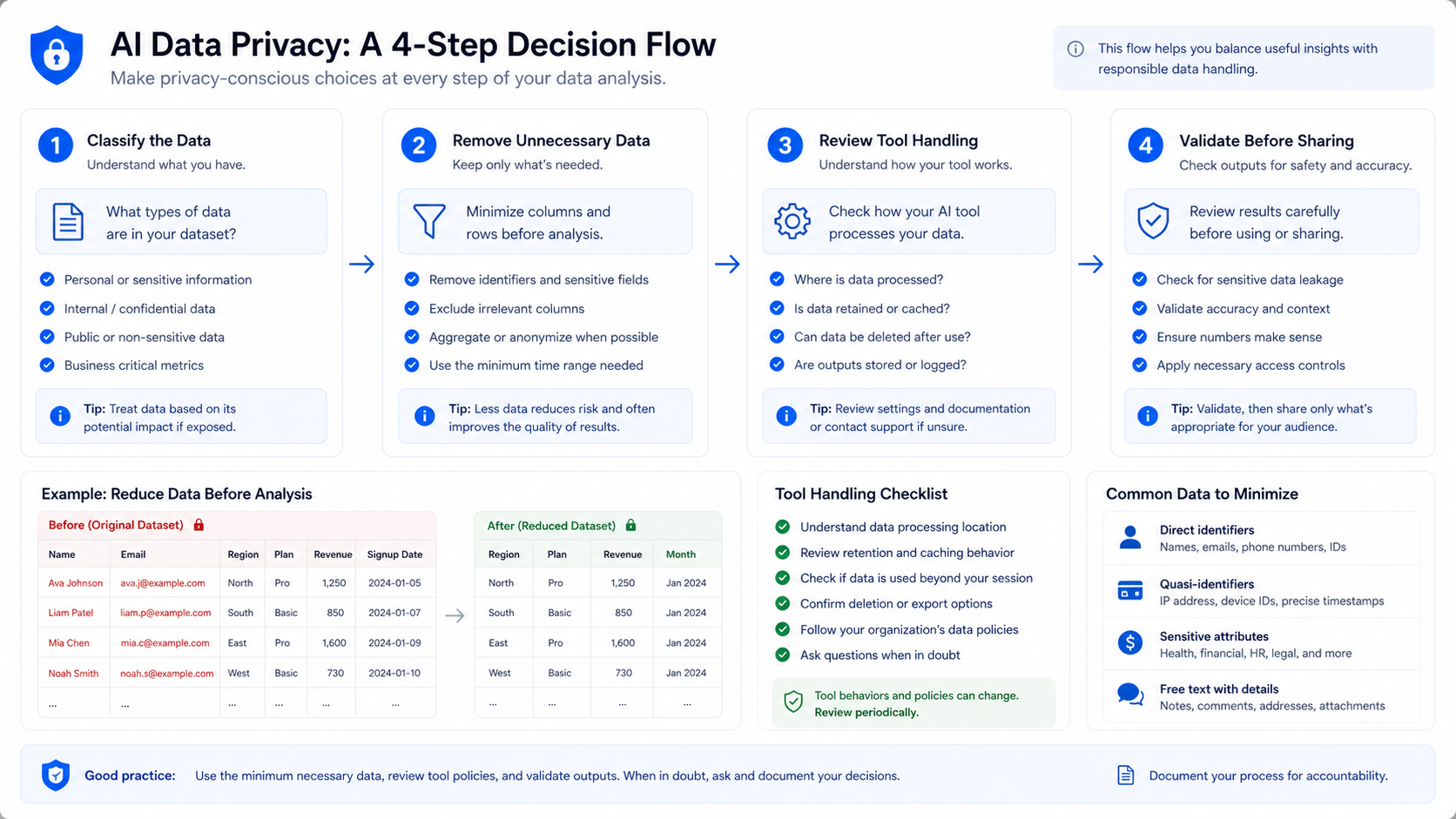
Privacy Checklist For AI Data Analysis Tools
Use this checklist when reviewing any file analysis tool for privacy, before uploading business data:
| Check | Good sign |
|---|---|
| File handling | Clear explanation of whether files are uploaded or parsed locally. |
| Retention | Clear statement on whether uploaded files are stored. |
| Training | Clear policy about whether user data trains models. |
| Deletion | Ability to avoid or remove stored data. |
| Data minimization | Workflow supports samples, schemas, or reduced columns. |
| Export control | You can download charts without exposing more data. |
| Vendor terms | Official docs explain data handling for your plan. |
Official documentation is the best place to verify vendor claims. For general privacy planning, use a framework such as the NIST Privacy Framework. For ChatGPT-specific workflows, review OpenAI's current data controls documentation before uploading sensitive files.
Data You Should Usually Remove
The exact answer depends on the task, but these columns often add risk without improving analysis:
| Column type | Usually remove when |
|---|---|
| Names | You only need aggregate trends or segment comparisons. |
| Emails | You are not analyzing email domains or deliverability. |
| Phone numbers | You do not need contact-level follow-up. |
| Account IDs | You can analyze by region, segment, or plan instead. |
| Free-text notes | Notes may contain private details unrelated to the metric. |
| Addresses | Region or state-level aggregation is enough. |
| Payment details | You only need revenue totals or payment status. |
If a column is needed for the question, keep it. If it is only there because it came with the export, remove it.
A Simple Risk Classification
Before choosing an AI workflow, classify the dataset. This does not need to be complicated. The goal is to slow down enough to avoid putting sensitive data into a casual workflow by accident.
| Risk level | Examples | Practical rule |
|---|---|---|
| Low | Public sample data, synthetic data, public benchmark files | Safe to use for demos and tutorials. |
| Medium | Internal sales exports, campaign reports, anonymized survey data | Remove unnecessary fields and review tool handling. |
| High | Customer-level data, employee data, contracts, financial details | Use approved workflows and minimize aggressively. |
| Restricted | Health, legal, regulated financial, security, or confidential board data | Follow internal policy before using any AI tool. |
Most day-to-day analysis sits in the medium category. That does not mean you cannot use AI. It means you should reduce the data, ask focused questions, and avoid uploading columns that do not change the answer.
Team Workflow For Safer Analysis
If a team uses AI data analysis repeatedly, privacy should not depend on each person remembering the right checklist. Create a small repeatable workflow:
- Start from an export template that excludes unnecessary identifiers.
- Use standardized column names so the AI does not have to guess.
- Keep raw files in the approved source system.
- Analyze only the columns needed for the question.
- Save the final chart or summary, not the raw sensitive file, when possible.
- Document any caveat before sharing the result.
This process improves privacy and quality at the same time. Clean inputs make the analysis easier to verify, and smaller datasets reduce accidental disclosure.
Questions To Ask Before Choosing A Tool
Before a team standardizes on an AI data analysis tool, ask questions that produce concrete answers rather than vague trust statements.
| Question | Good answer |
|---|---|
| What exactly is sent when I ask a question? | The vendor explains file parsing, schema, samples, and model requests clearly. |
| Are uploaded files stored? | The vendor states whether raw files are retained and for how long. |
| Can I use reduced or anonymized data? | The workflow supports minimized columns and aggregated rows. |
| What happens to prompts and outputs? | Logging, retention, and training behavior are documented. |
| Can I delete stored content? | Deletion controls are available when storage exists. |
| What plan or setting changes data handling? | Consumer, team, API, and enterprise behavior are separated. |
If a tool cannot answer these questions clearly, treat it as a higher-risk workflow for business data. That does not mean the tool is unusable; it means you should use public, synthetic, anonymized, or minimized data until the handling is clear.
Prompt Privacy Matters Too
Many people focus on the uploaded file and forget the prompt. Prompts can contain sensitive information if you paste raw rows, customer names, internal notes, or business strategy into the question.
Use focused prompts:
| Weak prompt | Better prompt |
|---|---|
| "Why did Jane Smith cancel after her refund request?" | "Group cancellation reasons by category and summarize common patterns." |
| "Analyze all customer notes." | "Summarize support-note themes after removing names, emails, and account IDs." |
| "Find the worst sales reps." | "Compare conversion rate by anonymized rep ID and explain data limitations." |
The safer prompt asks for the same analytical outcome without unnecessary personal detail.
How AnalyzeData Handles Your Data (And What It Does Not Claim)
AnalyzeData is a free (open beta) tool designed for privacy-conscious analysis of structured files. Here is the actual data path, stated plainly:
- Parsing happens in your browser. The file is read client-side; the raw file is not stored on an application server.
- Analysis is transient. The context needed to answer your question is processed in an isolated sandbox, with model calls on the API tier (OpenAI and Gemini). API-tier processing is not used to train models, and the analysis context is not retained after the job completes.
- Larger files travel as a temporary file. When a file is too big to send inline, it moves as a temporary file that is deleted when the analysis finishes.
- Nothing is stored unless you create a report. If you generate a shareable report, that report is saved so the link works. You can delete it anytime, and anonymous reports expire after 90 days.
- Every number is auditable. Answers link each number to the Python code that produced it, so you can see exactly what the analysis used.
- Anonymous aggregate usage counters exist. These track the shape of usage (for example, that an analysis ran), never the content of your data.
To be equally clear about what this is not: it is not "your data never leaves your device." Analysis requires sending schema, samples, or selected rows to a model. And it is not a claim that every dataset is suitable — for regulated health, legal, or confidential employee data, review your internal policy first and remove unnecessary sensitive columns before analysis.
The practical claim is narrower and more useful: AnalyzeData is built for everyday CSV, Excel, JSON, and TSV analysis where you want browser-first file handling, transient processing, and no uploaded-file database.
How Privacy Fits Into Tool Selection
Privacy is one criterion, not the only criterion. You still need the tool to answer the question accurately, explain limitations, and produce useful charts. For a broader view of tool selection, see the best AI tools for data analysis comparison.
Use this simple decision rule:
| Data sensitivity | Recommended workflow |
|---|---|
| Public or sample data | Any capable tool may be fine. |
| Internal business data | Minimize columns and review vendor handling. |
| Customer or employee data | Remove identifiers and use approved workflows. |
| Regulated data | Follow organization policy before using any AI tool. |
When in doubt, start with a reduced or anonymized file. You can still learn from the data without exposing every raw field.
Limitations
Privacy is not only a product feature. It is also a user workflow. If you paste private information directly into a prompt, or upload columns that are not needed, the tool cannot make that choice safe for you.
AI analysis should not be used as the only control for regulated data handling. For high-risk datasets, use approved enterprise systems, internal governance, and legal review.
FAQ
Is it safe to upload data to an AI analyzer?
It can be, if the tool documents its handling: where the file is parsed, whether analysis is transient, whether the provider trains on your data, and what is retained. Avoid tools that cannot answer those questions.
Is AI data analysis private?
It depends on the tool. Check whether the full file is uploaded, stored, logged, or used for training. Prefer workflows that minimize data exposure.
What is client-side parsing?
Client-side parsing means the browser reads the file locally before the analysis request is prepared. It can reduce the need to upload and store full files on a server.
Should I remove personal data before AI analysis?
Yes. Remove names, emails, IDs, phone numbers, notes, and any columns that are not needed to answer the analysis question.
Is AnalyzeData safe for confidential data?
AnalyzeData parses files in the browser, processes analysis transiently in an isolated sandbox without training on your data, and stores nothing unless you create a report. Larger files travel as a temporary file that is deleted when the analysis finishes. For regulated or highly confidential data, follow your organization's data policy before using any AI tool.
What is the safest prompt style?
Ask focused questions that use only the required columns. Avoid pasting raw private rows into prompts when aggregated or anonymized data would answer the question.
Ashesh Dhakal
Founder & Data Scientist
Ashesh Dhakal is a Data Science student at the University of Manitoba and a full-stack developer specializing in AI-powered applications. He holds a Computer Programming Diploma with Honors. His expertise spans explainable AI, natural language processing, and building production AI platforms.
Related Articles
How to Analyze CSV Data with AI (Free CSV Analyzer)
Analyze CSV data with AI free online — upload a CSV, ask in plain English, and get charts and statistics computed by real Python. No signup in open beta.
How to Analyze Excel Data with AI (Free, No Formulas)
Analyze Excel data with AI free: upload your .xlsx, ask in plain English, and verify every calculation without writing formulas. Real Python, no signup.
ChatGPT Data Analysis: When It Works & a Free Alternative
Can ChatGPT analyze data? Yes. See how it handles CSV and Excel files, where verified charts and reports differ, and a free no-signup alternative.